

At FindASpy headquarters, Tracer discovered that the morning pour-over had become an evidence exhibit.
The coffee was innocent. The parking meter beside it was not.
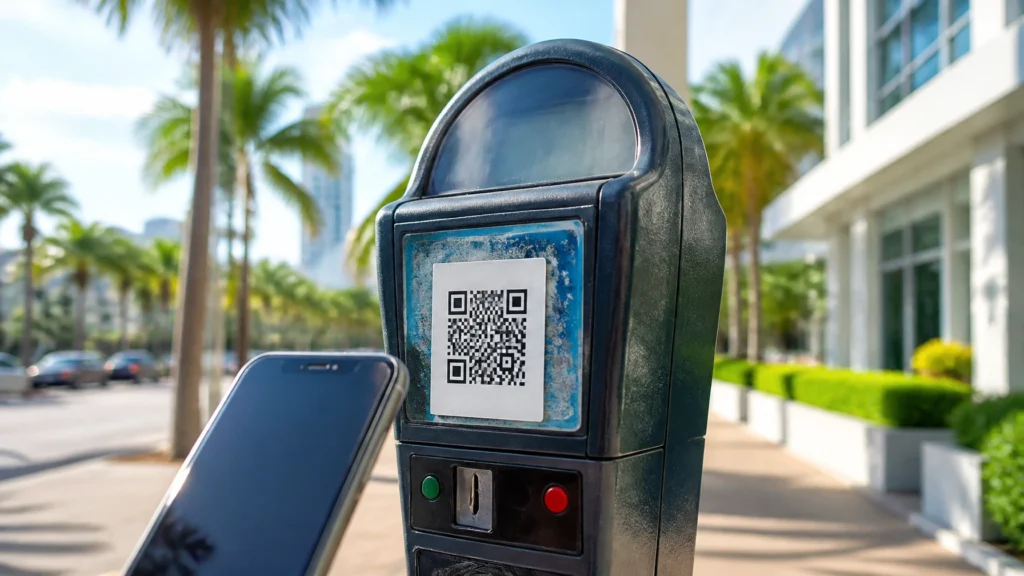
A white QR-code sticker had appeared on the meter overnight, covering the official payment instructions. Tracer leaned over the workbench, coffee in one hand and a magnifying glass in the other. His first conclusion was practical: “Either someone has tampered with this meter, or the city has launched the world’s most aggressive loyalty program.”
The meter had not joined a loyalty program.
A driver in a Florida downtown district had parked, scanned the sticker, and paid through the website it opened. The page looked official. The payment confirmation looked normal. But the money never reached the city. The sticker had redirected the driver to a scammer’s payment page.
This is the parking-meter QR-code scam. The Federal Trade Commission issued a consumer alert on September 3, 2026, warning that scammers are covering legitimate QR codes on parking meters with their own codes. The replacement code leads to a fake website designed to steal money, payment information, or personal data.
The lesson is simple: when a QR code is attached to a public object, inspect it before trusting it.

A QR code is a square pattern that your phone camera reads. It usually opens a website, app download page, menu, payment portal, or contact form.
The technology itself is legitimate. The danger is the object carrying the code.
In this scam, a criminal prints a new QR code on a sticker. The sticker is placed directly over the genuine code on a parking meter or sign. The fake code then opens a look-alike payment website.
The counterfeit page copies familiar colors, logos, and payment instructions. It may ask for:
The payment does not go to the city. It goes to the scammer or to a fraudulent payment processor controlled by the scammer.
The page may also collect information for a later attack. A criminal who obtains your email address and reused password may attempt to enter other accounts. Someone who receives your card details may make unauthorized purchases or sell the information to another criminal group.
That is why this is not merely a parking problem. It is a payment-fraud and identity-theft problem wearing a small square sticker.
The scam works because parking is a rushed activity.
You arrive downtown for work, an appointment, lunch, court, or a family event. Traffic is behind you. The meter has a short set of instructions. Your phone is already in your hand. The QR code appears to offer the fastest solution.
You are not careless. You are operating under time pressure.
Scammers take advantage of three normal human habits:
We trust objects in official-looking locations.
A code attached to a city parking meter appears more trustworthy than a random message.
We recognize familiar branding quickly.
A fake page using the name of a known parking app may look legitimate at a glance.
We want to finish the task.
Once the meter asks for payment, people focus on getting parked rather than inspecting the web address.
Working families and older adults are especially attractive targets because a fraudulent charge may be hidden among ordinary household transactions. A rushed driver may also reuse a familiar password to complete the payment.
Before scanning, examine the physical code.
A legitimate code is usually printed as part of the meter or its permanent payment label. A fraudulent code often looks like an afterthought.
Look for:
Do not peel, damage, or handle public equipment. Simply observe it and compare it with nearby meters. Photograph the suspicious sticker from a safe distance if your local authority permits it.
Florida drivers should be especially alert because fake QR-code parking schemes have been reported in multiple Florida communities, including warnings involving Fort Lauderdale, Orlando, and Miami-area parking locations. Payment rules vary by city. Some cities use QR codes. Others have removed them or use only a named parking app, a meter payment terminal, or a phone number.
Do not assume that a QR code is legitimate because it is located in Florida, on a city street, or beside an official sign.
Tracer’s Rover Word is a verification habit for people who travel between cities.
Before paying, identify the exact name of the city parking authority or payment app printed on the permanent meter instructions. Then use your phone’s browser or app store to find that service manually. Do not rely on the QR code to tell you where to go.
The “Rover Word” is the official service name you carry from the sign into your own search. If the QR code opens a different company, a strange domain, or a page with a slightly altered name, stop.
Many phones display a website address before you tap the link. Read that preview.
Look for:
A secure-looking padlock does not prove that a website is legitimate. It only indicates that the connection is encrypted. A scam website can also use an encrypted connection.
If the address looks wrong, close the page.

If your city lists ParkMobile, PayByPhone, or another provider, open the app yourself from your phone’s app list. If you need to install it, search for it directly in the Apple App Store or Google Play.
Enter the parking zone or space number from the meter. Do not let an unfamiliar QR code choose the app or website for you.
When available, use the physical meter’s card reader or coin slot. A sticker cannot redirect a direct payment made through the meter.
The OBD Port Witness is a separate parking-day privacy check. The OBD port is the diagnostic connection beneath your vehicle’s dashboard. It is used by mechanics and vehicle accessories.
Before leaving your vehicle, notice whether anything unfamiliar is connected beneath the steering column. A new device, loose wiring, or an object that was not there previously deserves attention. Do not pull on unknown equipment. Photograph it and seek professional help if necessary.
This check does not determine whether a QR code is genuine. It reminds you that a parking stop involves more than payment security. Your vehicle, phone, and personal information all deserve a quick inspection.
If the payment instructions seem unusual, contact the city parking authority through a phone number or website you locate independently.
Ask a specific question that a scammer’s page cannot answer, such as:
This is Tracer’s Unpredictable Human Challenge. You are not calling a number provided by the suspicious page. You are using an independently verified city contact and asking for confirmation before paying.
Do not panic, but act quickly.
First, stop interacting with the website. Do not call, text, email, or chat with anyone listed on the suspicious page. A scammer may use that contact to request more money or sensitive information.
Then:
Call your bank or card issuer using the number on the back of your card. Explain that you entered payment information on a fraudulent website. Ask whether the card should be blocked or replaced.
Review your bank and credit-card statements. Look for unauthorized charges, small test transactions, or unfamiliar recurring payments.
Change any password you entered. Change it everywhere else you reused it. Use a strong, unique password for every important account.
Turn on multi-factor authentication. Multi-factor authentication adds another verification step, such as an authenticator-app approval or security key, after the password.
Update your phone’s operating system and apps. Updates fix known security weaknesses and improve protection against harmful links.
Save evidence. Keep screenshots of the website, payment confirmation, suspicious URL, meter, sticker, date, and location.
Report the scam. Submit a report at ReportFraud.ftc.gov. Also notify the local parking authority and local law enforcement through an independently verified contact.
If you believe your phone or accounts were compromised beyond payment theft, FindASpy offers cyber consultation and digital security services. The company also provides guidance involving device and account security.
A QR code is an invitation, not proof.
Before paying, compare the physical label, preview the destination URL, verify the official payment method, and independently confirm anything that feels unusual. A few extra seconds at the meter are cheaper than replacing a card, recovering an account, or disputing a fraudulent payment.
Scammers want speed. Your strongest advantage is deliberate verification.
Have you seen a suspicious QR-code sticker on a parking meter, restaurant sign, toll notice, or public bulletin board? What Florida city: or what State: are you from?
Do you usually pay at the meter, use a parking app, or scan the QR code? Have you ever noticed a sticker covering an older label? What other public-place security checks would you like Tracer to investigate next?
Tracer reads all posts and pays attention to the experiences shared by this community. If you have found a hidden camera, tracker, microphone, or other hidden gadget, upload it for the community by clicking here.
🟩 Meet Sterling Reed – "TRACER"
Your vote helps determine FindASpy Insider’s Readers’ Top Picks. One rating is allowed per reader for each article.
Today’s Coffee Conversation
Tracer shares cybersecurity stories, scam alerts, privacy tips, and investigative insights. Pull up a chair, share your experience, and help shape tomorrow’s discussion.