

Category: Morning Coffee with Tracer
Morning at FindASpy.com headquarters in Florida is usually a symphony of humming servers, the gentle rustle of incoming intelligence reports, and the rich aroma of freshly brewed coffee. But today, our lead investigator Tracer was locked in a bitter, silent duel with the office printer.
It wasn't the air conditioning acting up, nor the mini-fridge humming off-beat, nor the desk lamp flickering, nor the water cooler bubbling. It was simply a jammed sheet of paper deep inside Feed Tray Two. Every time Tracer walked past it on his way to grab his French press, the flashing amber error light seemed to mock him. He’d pause, mutter something about legacy office tech, and promise himself he’d clear it after checking the latest batch of counter-surveillance tools. Of course, like most minor nuisances, it stayed jammed.
Settling down at his workbench with a steaming mug, Tracer pulled up a case file that hit painfully close to home, not just for corporate travelers, but for anyone checking into a hotel looking for a quick connection.
It happens after a grueling six-hour drive across state lines. You pull up to a grand hotel lobby, exhausted, luggage in hand. You check in, toss your bags on the luggage rack, and slide your key card into the slot. The first reflex of the modern traveler? Whip out the laptop or smartphone, click the Wi-Fi icon, and get online to catch up on emails or unwind with a show.
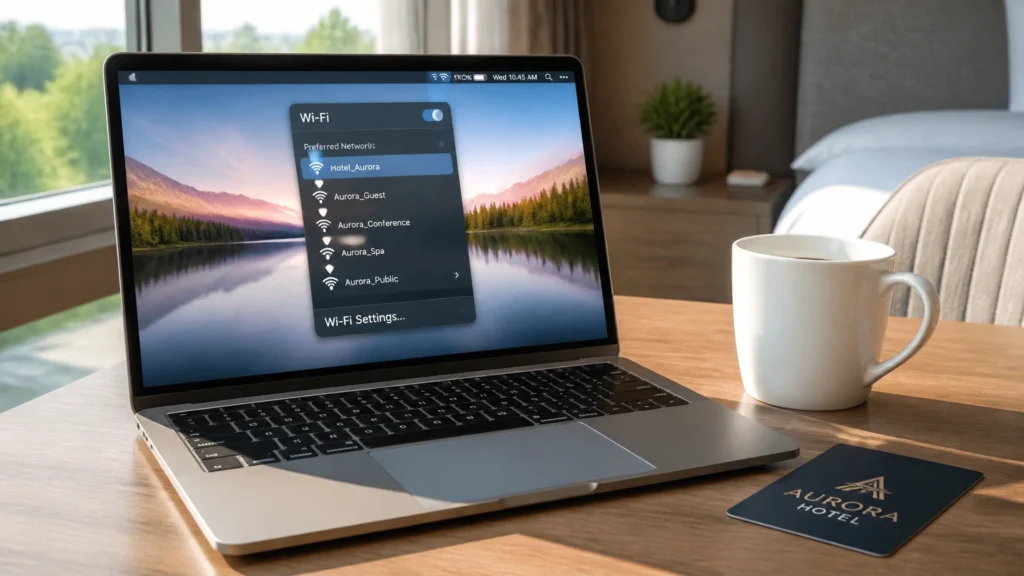
Tracer remembers checking into a high-end property after a late-night surveillance sweep. Opening his laptop, the available network list populated instantly:
Hyatt_GuestHyatt_ConferenceHyatt_Business_CenterLooking completely legitimate, right? Tracer clicked the one showing the strongest signal bar. Within seconds, a sleek, beautifully styled captive portal popped up on his screen. It featured the hotel’s exact branding, official fonts, and a clean login box demanding two simple things: Your Room Number and Your Last Name.

He entered his credentials and hit enter. Nothing happened. The page simply refreshed, asking for the same details again. Frowning, he tried a second time. Still nothing.
Sensing something was amiss, Tracer picked up the room phone and dialed the front desk.
"Ah, Mr. Tracer," the front desk agent replied politely. "Our official guest network is actually spelled Hyatt_Guest_WiFi with an underscore right before WiFi. The open networks showing up in your list? Management has no idea where those are coming from."
That missing underscore changed everything. The network Tracer had just connected to wasn't managed by the hotel. It was a rogue access point: a malicious trap deployed just feet away in a neighboring room.
What Tracer encountered is known in the security world as an Evil Twin or rogue access point attack.
Scammers and corporate spies don't always need complex malware to compromise your devices. Sometimes, all it takes is a compact, battery-powered portable router or a specialized Wi-Fi pineapple device tucked inside a backpack.

Here is how the scam unfolds behind the scenes:
Hyatt_Guest, Hotel_Free_Wi-Fi).Many users believe that because websites use HTTPS encryption today, public Wi-Fi is inherently safe. Unfortunately, sophisticated cybercriminals have evolved.
You don’t have to live offline when traveling, but you do need to operate with absolute vigilance. If you want to protect your digital footprint while on the road, follow these four rules from Tracer's master playbook:

Never guess which Wi-Fi network belongs to the venue. Ask front desk staff explicitly: "What is the exact SSID, is it open or password-protected, and should I expect a captive portal?" Get it in writing or from a printed card if possible.
Before joining any public or hotel network, turn on a reputable Virtual Private Network (VPN). A strong VPN encrypts all data leaving your device, rendering it completely unreadable to anyone operating a rogue access point or man-in-the-middle relay.
When a login page pops up automatically, check the browser's address bar. If the domain name looks like a string of random characters, a personal blog domain, or anything other than the official hotel property domain, close the browser immediately and disconnect.
When in doubt, bypass hotel Wi-Fi entirely. Turning your smartphone into a secure personal cellular hotspot is vastly safer than trusting an unknown local network infrastructure.
Whether you're safeguarding your home network or securing your digital life on the road, awareness is your first line of defense. If you suspect your devices have been compromised by rogue connections, spyware, or hidden tracking gear, you don't have to navigate it alone.
Explore our professional counter-surveillance services or browse our complete catalog of equipment. Need immediate, discreet assistance from our licensed team? Call Patricia directly at 321-342-0040.
Disclaimer: The stories Tracer shares are based on real scams and security threats actively targeting our community. While the names and specific scenarios are crafted to protect identities, these tactics are a matter of when, not if. Tracer brings these to you fresh : so you see it here before it shows up at your door.
We want to hear from you. Have you ever connected to a public Wi-Fi network that felt "off" or suspicious? Which State are you tuning in from today? Drop a comment below, and let us know what topic you want Tracer to tackle next!
Tracer reads every single comment. Want to share your own security find or hidden gadget discovery? Upload it to our community archive by clicking here.
Tracer’s Pick: Drop a thoughtful comment on today’s post for a shot at receiving one of Tracer’s favorite portable signal-testing tools!
Tomorrow’s Hint: We’re stepping away from hotel lobbies and looking into the digital whispers hiding right inside your home office printer… Speaking of that jammed tray, Tracer finally fixed it. Until tomorrow!
Your vote helps determine FindASpy Insider’s Readers’ Top Picks. One rating is allowed per reader for each article.
Today’s Coffee Conversation
Tracer shares cybersecurity stories, scam alerts, privacy tips, and investigative insights. Pull up a chair, share your experience, and help shape tomorrow’s discussion.